Virgin Atlantic
- 4.3
- Rating
- 100.00K
- Installs
- Free
- Price

 Analysis by App-foxy
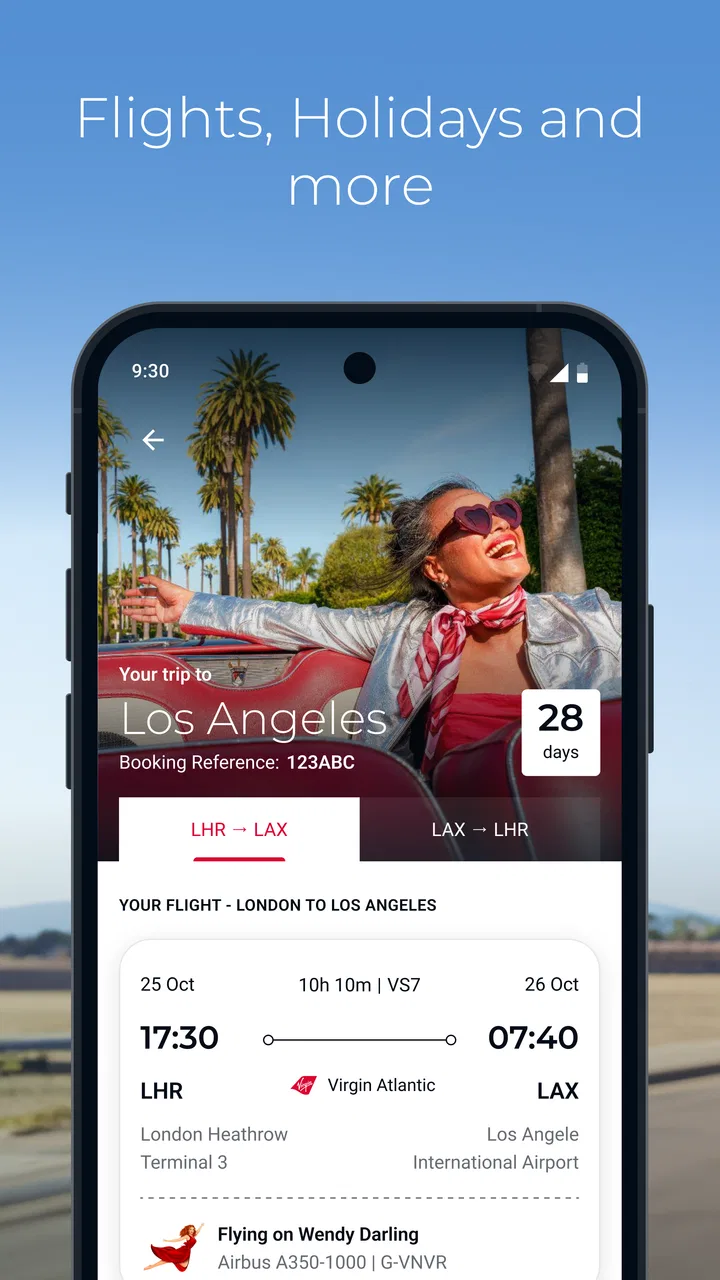
When I open a travel app before a trip, I am usually trying to solve a very practical problem: turn a vague plan into something I can actually manage. I want to look at flights, check the details of a holiday, and keep the next step clear without jumping between unrelated tools. Virgin Atlantic is designed for that situation. It is a free Travel & Local app from Virgin Atlantic, aimed at bringing the airline’s flight and holiday journey into one mobile starting point.
My first impression is that it makes the most sense when Virgin Atlantic is already part of my travel plans. It is not trying to be a universal travel marketplace where I compare every airline and every hotel in one place. Instead, its value comes from staying close to the airline’s own booking and travel process. That focus can make the journey easier for an existing customer, although it also means the app is less useful if I am still shopping broadly across carriers.
The app is available free of charge and carries an Everyone age rating, so it is approachable for a wide range of travellers. Virgin Atlantic is the developer, and the app has built a 4.3 average from around 951 ratings, with more than 100 thousand installs. Those figures suggest a reasonably established travel companion rather than an obscure download, but I still judge it by how well it handles the moments that matter: preparing, checking, travelling, and recovering when plans become complicated.
You May Also Like

 Blood Strike: 2.5 Anniversary
Blood Strike’s Loadouts Turn Every Drop Into a Tactical Gamble
A close look at Blood Strike’s custom loadouts: how fast access to signature weapons reshapes its battle royale rhythm, rewards preparation, and narrows the gap between fights.

 Pandora - Music & Podcasts
Pandora’s Music Is Easy to Start, but Harder to Recover
Pandora’s strength is its low-effort path from a seed to a station. Its weak spot is how much confidence it asks you to place in connection, setup, and quiet recovery.

 8 Ball Pool
8 Ball Pool Is Built on Rivalries, Rematches, and Routine
A close look at the rivalries, rematches, shared routines, and unanswered safety questions that turn a quick pool match into a persistent mobile community.

 Samsung Music
Samsung Music’s Quiet Strength Is Playing What You Already Own
Its reach comes less from spectacle than from dependable access to a personal library. That simplicity is both the app’s strongest retention engine and its ceiling.

 AccuWeather: Weather Radar
AccuWeather Review: A Quick, Clear Forecast for Everyday Decisions
For everyday plans, the best forecast is the one you can understand quickly. AccuWeather makes rain timing, radar, and local conditions easy to act on, with a few trade-offs.

 Hill Climb Racing
Why Hill Climb Racing Still Turns Crashes Into One More Run
A tiny car, a bumpy hill and one more upgrade: Hill Climb Racing keeps resurfacing because its simple chaos makes every near-miss feel personal.
More From Our News Desk



From an unfinished travel idea to a usable plan
I find the planning stage is where a focused airline app can earn its place: it gives me a reason to turn a loose idea into a journey I can check and prepare for. I would first decide whether Virgin Atlantic is already my likely carrier or whether I still need to compare options across airlines. That choice sets up the next section, which looks at how to make the app useful without expecting it to do every travel job.
The starting condition matters more than the download
I would begin with a simple question: am I already committed to Virgin Atlantic, or am I comparing the whole market? If I have a Virgin Atlantic booking, the app has an obvious job. It can become the place I return to when I need to move from a confirmation email or a general holiday idea toward the actual journey.
If I am still deciding between several airlines, I would not make this my only research tool. A broad flight-search service is usually better for comparing different carriers, departure airports, schedules, and combinations. Virgin Atlantic is more specialised. That is not a weakness by itself; it is a trade-off. A focused airline app can be calmer after I have chosen the airline, while an independent comparison tool is usually stronger at the beginning of the decision.
That distinction is one of the most useful things to understand before installing it. I would not expect this app to replace every travel service on my phone. I would use it as the airline-specific layer of a wider travel workflow: compare options elsewhere if necessary, then use this app once Virgin Atlantic becomes the relevant company.
What I do first inside the app
My first pass would be deliberately short. I would open the app, identify whether I am looking at flights or holiday planning, and then connect what I already know about my trip with the information presented there. The important habit is to begin with the booking or journey context rather than browsing randomly. Travel apps become confusing when I treat them like social feeds; this one is more useful when I approach it as a checklist.
For a flight, I would have the basic travel information ready before I start: the route, the timing, and any booking details that the app asks me to use. That small preparation reduces the most common source of friction in airline apps, which is not necessarily the interface but the handoff between a person’s memory, an email, and the mobile screen. If I have to search through several messages while standing in an airport queue, even a simple process feels difficult.
For a holiday, I would take the same approach but allow more time to review the overall arrangement. “Holiday” can involve more than the flight itself, so I would not assume that checking one part of the journey means I have checked everything. I would read the travel details carefully, confirm that the information matches my own documents, and save myself from relying on a quick glance at a single screen.
A practical workflow before leaving home
Imagine I am leaving for a short break. The night before departure, I open the app with my confirmation email nearby. I use the app to orient myself around the Virgin Atlantic part of the journey, then compare what I see with the email and my passport details. I am not trying to discover the whole trip at that moment; I am checking that the digital version of my plan is coherent.
This is where I find a focused airline app helpful. Instead of opening a generic booking site that may show advertising, unrelated offers, or many alternative routes, I can concentrate on the carrier I am actually using. The mental benefit is small but real. I am less likely to confuse a search result with a confirmed arrangement.
I would also take a screenshot or keep the original confirmation available if I knew I might have weak connectivity later. That is not a special feature claim about the app; it is simply sensible travel preparation. A mobile app should be part of my backup plan, not the only record of a reservation. Airports, underground transport, roaming changes, and a low battery can all interrupt a smooth digital workflow.
My best tip is to use the app for organisation, but keep independent evidence of the trip. I would retain confirmation emails and essential travel documents, then use the app as the convenient place to review the airline-side information. That division of responsibility prevents one missing login, dead battery, or delayed connection from becoming a much bigger problem.
Where the first handoff happens
The first handoff is between my travel research and the airline’s own environment. If I found a possible route through a comparison service, I would still want to know exactly what happens when I move into Virgin Atlantic’s app. I would check that the journey I am reviewing is the one I intended to book, rather than assuming that the transition preserved every detail.
The second handoff is between the app and my personal travel documents. Names, dates, airports, and passenger information need to agree. This is a mundane step, but it is more important than attractive presentation. A polished screen cannot correct an error in the information I supplied or an assumption I made while booking.
For families or groups, I would be especially careful here. One person may hold the booking while another person carries the passports, and a third person may be responsible for transport to the airport. The app can support the airline side of the plan, but it does not remove the need for clear communication between travellers. I would send the relevant details to the people who need them instead of assuming everyone will see the same mobile view.
Using it during the journey
On travel day, I would use Virgin Atlantic as a reference point rather than constantly refreshing it without a reason. Before leaving home, I would review the journey. On the way to the airport, I would check the information that is relevant to the next handoff. At the airport, I would compare the app with the signs and announcements around me, because the airport remains the physical source of many immediate instructions.
That last point is important. An airline app can be convenient, but it does not replace airport staff, gate displays, or official announcements when circumstances change quickly. If the information on my phone and the information at the airport appear different, I would not blindly follow the older-looking screen. I would verify the situation through the most immediate official channel available.
I also would not treat the app as a substitute for arriving prepared. I would still know which terminal or airport I am travelling from, allow time for security, and keep identification accessible. The app can reduce the number of times I search through messages, but it cannot remove the physical steps of flying.
How the result feels when the workflow works
The successful outcome is not that the app entertains me or gives me endless travel content. The outcome is simpler: I know which Virgin Atlantic journey I am dealing with, I can find the relevant details without reconstructing the booking from memory, and I have a clearer handoff from planning to travelling.
That makes the app particularly suitable for people who prefer one airline-specific place to revisit. Frequent Virgin Atlantic customers may appreciate the familiarity of returning to the same environment, while occasional travellers can use it as a companion for a particular booking. It also has a sensible role for someone who dislikes carrying a thick collection of printed pages but still wants a digital overview.
For holiday travellers, the benefit is potentially broader because the trip begins before the flight. I would use it to keep the airline-related part of the holiday visible while using other tools for areas outside that scope. For example, I might use a map app for local transport, a hotel’s own app for accommodation, and a separate currency tool for spending. The strength here is not replacing those services; it is keeping the Virgin Atlantic portion from becoming disconnected.
Where I would compare it with alternatives
Compared with a general flight-search app, Virgin Atlantic offers a narrower but more relevant experience once I have chosen the airline. A comparison service is better when I need to scan many carriers or find the cheapest combination across providers. It can also be more convenient for an open-ended trip where I have not decided on a route.
Compared with a generic itinerary organiser, Virgin Atlantic has the advantage of being tied to the airline involved in the booking. A general organiser may gather flights, trains, hotels, and restaurant reservations into one timeline, which is useful for complex multi-company trips. The airline app is more natural for the Virgin Atlantic handoff, but it is not the tool I would rely on to manage every independent part of a long journey.
Compared with using only a mobile browser and email, the app offers a more direct place to return to. The trade-off is another app, another account or session to manage, and another place where I might need to check information. If I fly with many different airlines, installing every carrier’s app can make my phone cluttered. In that case, a browser, email folder, or itinerary organiser may be a better central hub, with this app reserved for trips where its airline-specific role genuinely helps.
Small frictions that can change the experience
The first friction is scope. If I expect one app to manage every airline, hotel, transfer, and activity, I will probably be disappointed. Its identity is tied to Virgin Atlantic, so its usefulness rises when my trip is tied to that developer and falls when my plans are spread across unrelated providers.
The second friction is the difference between viewing information and acting on it. A mobile screen can make a booking easier to find, but I still need to read the details and understand what they mean. I would not skim a holiday arrangement just because it appears neatly inside an app. Important travel decisions deserve the same attention as they would on a website or in an email.
The third friction is disruption. Delays, airport changes, missed connections, and unusual requests are the moments when travellers want instant certainty. I would use the app as one source of current guidance, but I would also look for airport announcements and human assistance when the situation becomes urgent. A digital workflow is excellent for routine preparation; it is less reassuring when the journey leaves the routine path.
There is also a practical device consideration. The current version is 1.7.0 and requires at least operating system 10. Before relying on it for a trip, I would make sure my phone meets that requirement and that the app is updated ahead of departure rather than in the boarding area. I would also charge the phone and keep the booking reference accessible elsewhere. These steps sound obvious, but they are exactly the kind of preparation that protects a useful app from becoming a single point of failure.
Who should use it, and who should skip it
I would recommend Virgin Atlantic to a traveller with a Virgin Atlantic flight or holiday who wants a direct mobile companion for the airline side of the journey. It is also a reasonable choice for people who prefer checking travel information in an official airline environment instead of relying entirely on search results, email threads, or a third-party organiser.
I would be more cautious if I were still comparing airlines, building a multi-carrier itinerary, or trying to keep every reservation from different companies in one unified timeline. In those cases, I would start with a comparison or itinerary tool and add this app only if Virgin Atlantic becomes part of the final plan.
I would also skip it as my main travel organiser if I rarely fly with this airline and do not have a current booking to manage. A free download is easy to justify when it solves a present problem, but there is little value in collecting airline apps simply because they exist.
My final take after following the whole journey
Virgin Atlantic works best when I treat it as a focused travel companion rather than a universal holiday command centre. Its natural workflow begins with an airline-specific plan, moves through booking and document checks, supports the handoff into airport travel, and ends with a clearer view of the Virgin Atlantic part of the trip.
I like that focus because it matches how I actually use airline apps: not for endless browsing, but for returning to a journey at several important moments. The main limitations are equally clear. It will not replace broad comparison services, independent itinerary organisers, airport information, or personal travel documents. Travellers with complicated, multi-provider plans may prefer a wider tool as their main hub.
Still, if Virgin Atlantic is the airline I am flying, I would install it before the trip and test the workflow while I am still at home. I would confirm the journey, compare the details with my booking records, prepare a backup, and then use the app as a convenient reference during travel. With that realistic expectation, Virgin Atlantic is a useful free addition for the right traveller: focused, practical, and most valuable when the airline is already central to the plan.
FAQs for Virgin Atlantic
01What is the Virgin Atlantic app used for?
The Virgin Atlantic app is designed to help passengers manage most parts of their journey from a mobile device. After signing in, you can check upcoming flights, review booking details, choose or change seats where available, access check-in information, and receive travel updates. It is particularly useful for keeping your itinerary and important flight notifications in one place while travelling.
02Can I book a Virgin Atlantic flight through the app?
Yes, the app can be used to search for and book Virgin Atlantic flights, depending on your departure route and current availability. You can compare available flight options, select a cabin class, enter passenger details, and review the fare before payment. However, some complicated bookings, group reservations, or journeys involving partner airlines may be easier to arrange through the official website or customer support.
03Can I check in and access my boarding pass in the Virgin Atlantic app?
The app generally supports mobile check-in for eligible Virgin Atlantic flights and may provide a digital boarding pass after the process is completed. Availability can depend on your route, airport, ticket type, and whether additional document checks are required. It is still sensible to carry valid identification and allow extra time at the airport, especially when travelling internationally or with checked baggage.
04Does the Virgin Atlantic app provide live flight updates?
Yes, one of the app’s most useful features is access to flight information and travel notifications. Depending on the journey, you may receive updates about departure times, gate changes, delays, cancellations, or other operational changes. Notifications require suitable device permissions and an internet connection, so passengers should also check airport screens and listen for announcements in case information changes quickly.
05Is the Virgin Atlantic app free, and what devices does it support?
The Virgin Atlantic app is normally free to download, although using it requires an internet connection and your usual mobile data or Wi-Fi charges may apply. It is intended for supported Android and iOS devices, but the exact compatibility can vary according to the operating system version. For the best experience, keep the app updated and use the latest compatible software available on your phone.
Pros
- Easy mobile check-in and access to digital boarding passes.
- Flight status updates help track delays
- gates
- and schedule changes.
- Manage bookings
- seats
- and travel details directly from the app.
- Useful onboard entertainment and destination information for travelers.
- Clean interface makes essential trip details quick to find.
Cons
- Some features may require an internet connection while traveling.
- App performance can vary during busy travel periods.
- Not all booking changes may be completed in the app.
- Notifications may arrive late when airport information changes quickly.
- Users may need the website for complex bookings or special requests.

Virgin Atlantic
Gallery